Step 1 of 5 • Platform Overview
Welcome to Kenya's #1 Social Media Marketing Panel
SocialBoost Kenya is your automated powerhouse for boosting TikTok, Instagram, YouTube, X (Twitter), and Facebook. Whether you are an influencer, musician, local business, or agency reseller, get instant growth delivered automatically via Lipa Na M-Pesa.
Instant Automation
Orders dispatch directly to upstream servers in seconds.
Safaricom M-Pesa
STK push PIN prompt sent directly to your phone with 0% fee.
100% Password-Free
We never ask for account passwords. Only public profile links.
Step 2 of 5 • Wallet Top Up
How to Deposit Funds via Lipa Na M-Pesa
All services on SocialBoost Kenya are priced in transparent Kenyan Shillings (KES). You must fund your account wallet before placing dashboard orders (or use 1-click Quick Order).
1
Go to Add Funds
Click Add Funds in the header or menu.
2
Enter Phone & Amount
Select Lipa Na M-Pesa (Automated). Enter your phone number (e.g. 0712345678 or 0112345678) and the amount in KES (minimum KES 10).
3
Enter PIN on Handset
A Safaricom STK prompt appears on your phone screen. Enter your secret M-Pesa PIN. Your balance updates instantly!
Step 3 of 5 • Placing Orders
Selecting Services & Submitting Orders
With funds in your wallet, you have access to over 2,000+ vetted Kenyan and global services.
1
Choose Category & Service
Go to New Order. Select your platform (e.g. TikTok Followers Kenya, Instagram Likes High Quality, YouTube Watch Hours).
2
Paste Your Link & Quantity
Paste your profile or post link, enter the quantity you want, and review the calculated total price.
3
Submit & Automated Delivery
Click Submit Order. Our API instantly dispatches your request. Average delivery begins within 1 to 15 minutes!
Step 4 of 5 • Golden Rules
Crucial Rules: Avoid Order Delays & Drops
99% of order stalls happen because of basic profile settings. Ensure your links comply with these simple rules:
1. Profile MUST Be Public
Ensure your Instagram, TikTok, or Twitter account is set to PUBLIC, not private. Private accounts will fail and cannot be refilled.
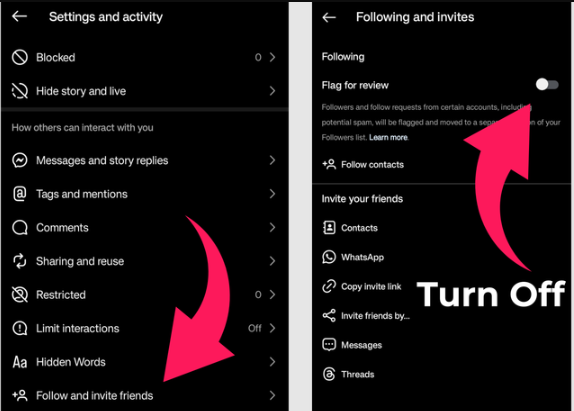
2. Instagram: Turn OFF "Flag for Review"
On Instagram, navigate to Settings & Privacy → Follow and invite friends → toggle OFF "Flag for review". If this is turned ON, incoming followers get queued in review and won't count on your public counter!
3. Use Correct Public URL Format
Always use full links (e.g. https://www.instagram.com/yourusername or https://www.tiktok.com/@yourusername). Never enter your password or phone number as the link.
4. Don't Double-Order the Same Link Concurrently
Wait for an active order on a link to complete before submitting another order on the exact same link to avoid server start-count conflicts.
Step 5 of 5 • Tracking & Support
Real-Time Order Tracking & 24/7 Support
You're all set! Everything on SocialBoost Kenya is tracked transparently from start to finish.
Live Order Log
Track real-time progress (Pending → In Progress → Completed) under Orders Log. If a server ever fails, funds are automatically refunded to your wallet balance.
24/7 AI Assistant Stella
Have a question about an order or service? Click the chat bubble on the bottom-right anytime. Stella can check order status, explain services, and solve questions instantly.
Direct Human WhatsApp Helpline
Need urgent help with a large bulk deposit or custom order? Reach our Nairobi team directly on WhatsApp: +254 747 255 380.